Part 05 · for the manager and the foreman
Every slab counted.
Every job in its place.
Kerfline lays your parts on the slab with the least waste, takes the slab from your own stock, and puts the job on the workshop board, the same board your foreman keeps on paper. It all runs on your own machine, with or without the internet.
PartKept offcutWasteFlaw
Utilisation 0.0%
01 · Cut11 parts on one slab, one of them an L. Two flaws: one the plan avoided, one that fell inside the sink cut-out and does no harm.
The waste isn’t in the slab. It’s in the paper.
Nesting by hand
The foreman sketches the layout on paper. It works, until the order carries four hundred parts and fifty sizes.
One slab too many
One extra slab per order, ten times a year, is a number you feel at the end of the year. The dearer the stone, the dearer the mistake.
A stock nobody trusts
Slabs on the rack, offcuts behind the rack, and a notebook that says otherwise. Every count is an argument.
Five steps. Nothing to learn.
1
Measure
Type the parts or paste them from Excel. Length, width, quantity.
2
Optimize
The slab comes from your stock. The plan avoids the flaws you marked.
3
Reserve or approve
Reserve for a customer who is still deciding, or approve and the stock moves.
4
Cut from the board
The job appears on the weekly board. ❌ then ✓ with the foreman’s fingers, not a form.
5
See it on your phone
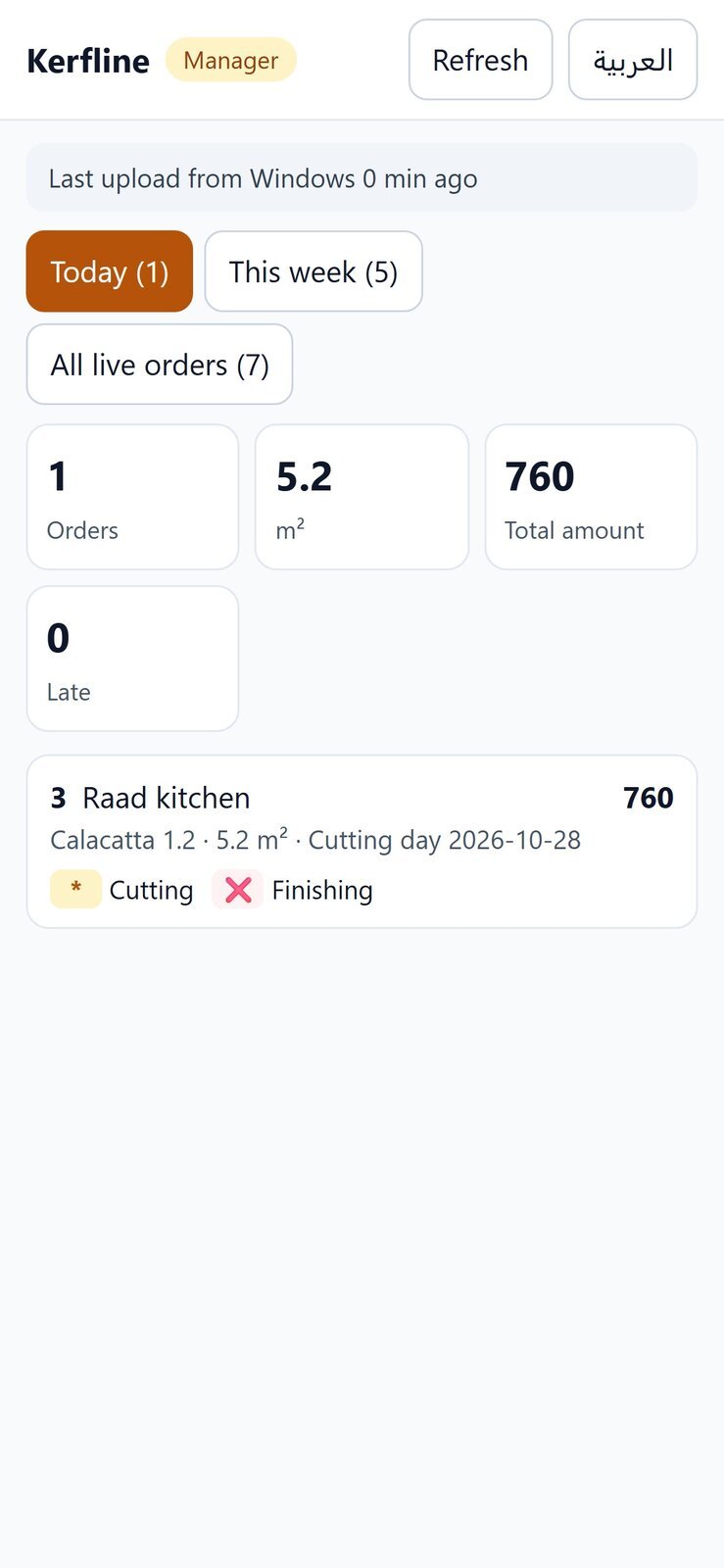
Today, this week, the amounts: a summary encrypted from Windows to your pocket.
One full workshop year, run inside the program before it reached yours.
A simulated year with a limited opening stock and no purchases, run to the last slab. The numbers are from that run, not from a brochure.
153slabsevery one of them cut for a real job
784m²of stone through the ledger
34%of consumption came from offcuts that would have been thrown away
158dayswithout a single number the owner corrected by hand
What it does, in the order you’ll use it.
Six parts of one program. Each one was built against a real workshop problem and proven on the built program before it shipped.
Kerfline
1 · Cutting plans
From the measurements to a drawing the operator reads without asking you.
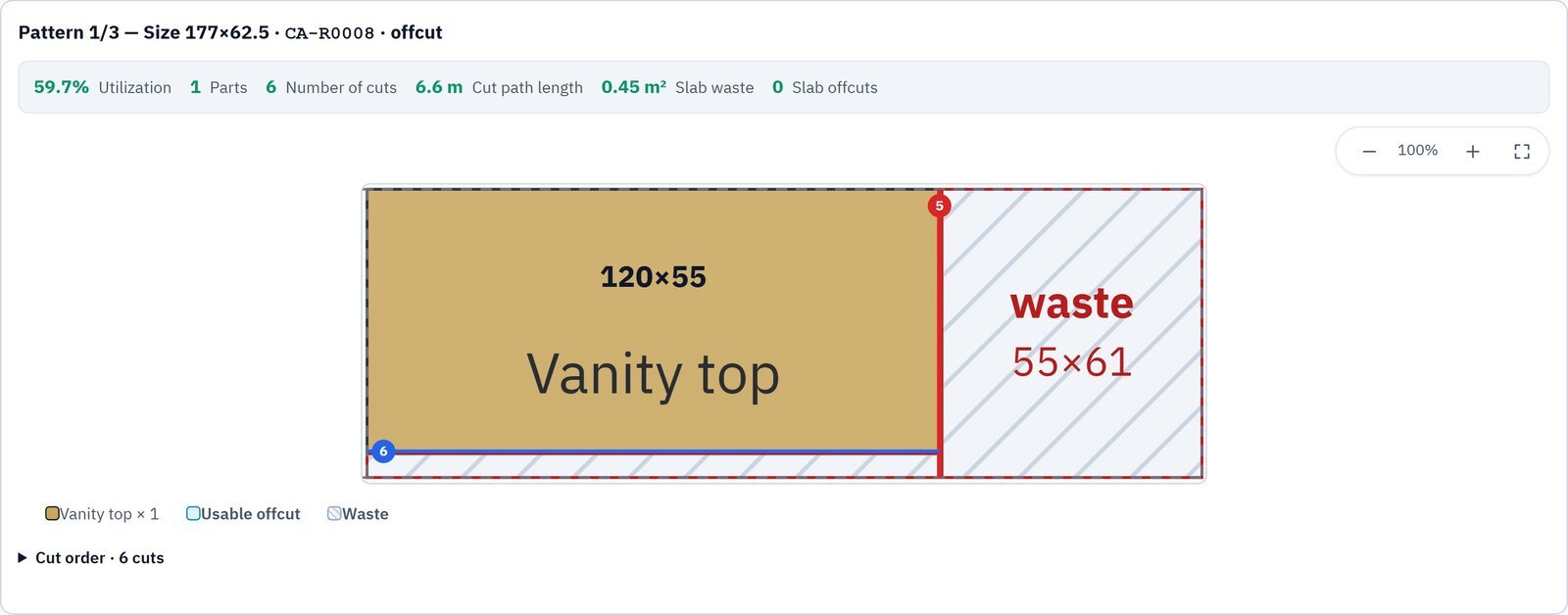
Parts from Excel
Paste the order as it comes from the customer. Quantities, part names, orientation.
Least waste
The optimizer fills the slab and keeps the offcut that is still worth keeping.
Flaws avoided
Mark a crack or a stain on the slab; the plan works around it.
L-shaped parts
Notched parts are laid out on the slab and drawn on the plan like any other part.
Cuts your saw can make
Every cut runs edge to edge. Blade thickness and trim are counted.
Quote and DXF
A printed quote with your logo, and a DXF file for the machine.
Pro
Edges and holes
An edge treatment on each side, priced per linear metre; sink, hob and socket cut-outs on the plan and in the DXF.
Pro
Labels with barcodes
A label per part, lot or offcut, A4 sheet or thermal printer, with a Code 128 barcode and a QR.
Kerfline Pro
2 · Stock that does not lie
Slabs, offcuts and a ledger nobody edits by hand.
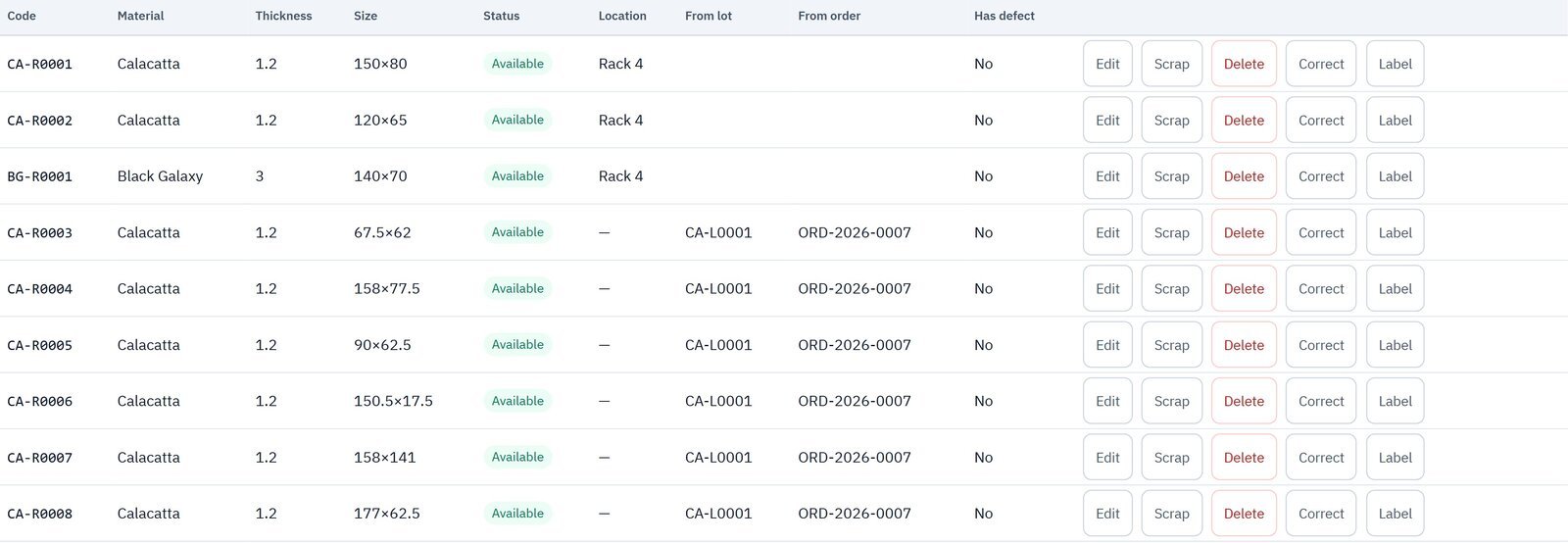
Materials, lots, offcuts
Every slab has a code. Every offcut has a code and a parent lot.
A ledger, not a table
Every number change is a movement with before, after, reason and who. The file verifies itself.
Reservations
Reserve slabs for a customer who is still deciding. Released or approved later, and nothing is lost in between.
Offcuts cross jobs
The offcut from Tuesday’s kitchen is offered first for Thursday’s bathroom.
Corrections with a reason
Broken slab? Count the real number, choose the reason, enter the manager code. The correction is a movement too.
Reports in m²
Consumption, offcuts made, scrap, per material, per period, across years.
Kerfline Pro
3 · The workshop board
The weekly board your foreman keeps on paper, with the stock behind it.
Jobs in rows, sections in columns
Cutting, finishing, installation. ❌ then * then ✓ with a finger.
Day load
How many square metres each day carries, so tomorrow is not promised twice.
Re-cut a single piece
One piece broke? Choose it, choose the slab or offcut, approve. The job gets 50-A, and the stock moves.
Requirements before start
Deposit, drawing, confirmation: the job does not start before what you require.
Excel in and out
Import last year’s sheet; export this week’s board for the office.
Archive and cancellations
Delivered jobs archive with their numbers. Cancelled ones keep their story.
Kerfline Pro
4 · The year
Numbers per year, a closing with a manager code, and past years you can read but not touch.
ORD-2026-0001
Every year starts from one. Last year’s numbers stay valid.
Close the year
The ending stock becomes the opening stock. Open reservations and unfinished jobs carry over.
Past years, read only
The archive opens on the same screens. Not one button writes.
Reopen before December 31
Closed too early? Reopen and everything returns exactly as it was.
Reports across years
A period report from November to February reads both files and counts nothing twice.
Kerfline Pro
5 · The manager’s phone
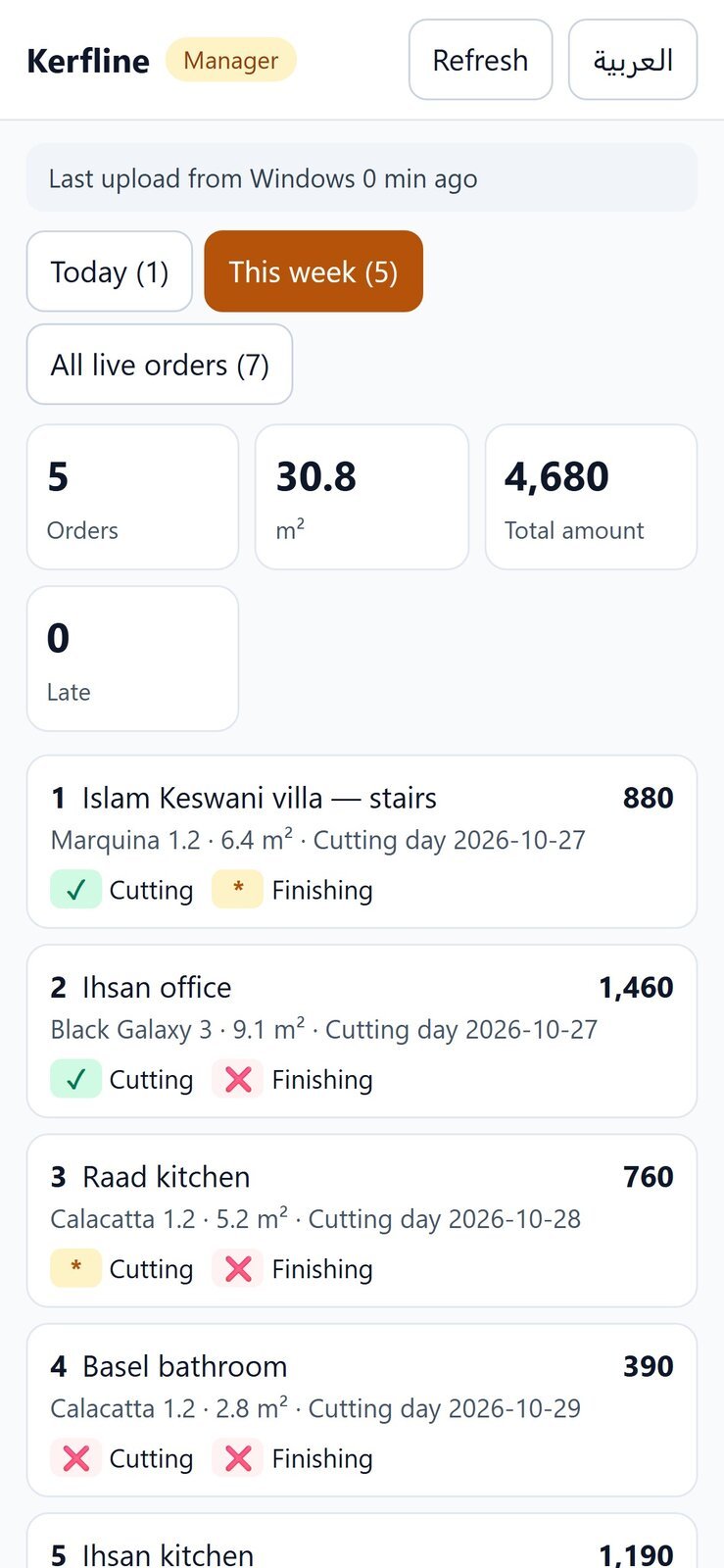
Today, this week, the amounts in your pocket: a summary encrypted from Windows to the phone.
Scan once
A QR on the Windows screen links the phone. Nothing to sign in to.
Two weeks at a glance
Which jobs are where, what is due, what was delivered.
The server is blind
The summary is encrypted before it leaves the workshop. The server stores what it cannot read.
Kerfline Pro
6 · Security and support
Built for a workshop that cannot afford a wrong number.
Backed up to your account
Every save on Windows is also backed up to your account automatically. On the phone, type the manager code to download the same stock.
One writer
Only Windows writes the stock. Android and the browser read.
The red path
Downloading over a full file, restoring a backup, importing a stock file over it: a red box, what will be lost, and the manager code.
Backups before every write
The last ten, one per hour for a day, one per day for two weeks.
Error codes
Every message ends with a code like [ST-05]. Your operator reads it to us; we know exactly what happened.
Start with the cutting. Add the workshop when you’re ready.
Kerfline for plans, quotes and DXF; Pro adds edges, holes, labels, stock, reservations, the board, the year and the manager’s phone. A yearly licence per workshop, and devices are yours to move.
| Kerfline | Kerfline Pro | |
|---|---|---|
| Cutting plans: Excel, least waste, flaws, L parts, saw cuts | Yes | Yes |
| A quote with your logo and a DXF file | Yes | Yes |
| Edges, holes and barcode labels | — | Yes |
| Stock: lots, offcuts, reservations, movements ledger | — | Yes |
| The weekly workshop board and re-cuts | — | Yes |
| The year, the archive and reports across years | — | Yes |
| The manager’s phone and a copy on the account | — | Yes |
A workshop without a cutting department uses Pro for stock and orders only; that changes the use, not the program.
Kerfline
Cutting plans, defects, quotes, DXF. For any workshop that cuts sheets or slabs.
2 devices, Windows or Android
- Optimizer with flaws and L-shapes
- Quote with your logo
- DXF export
- English and Arabic
- Works offline
Kerfline Pro
Everything in Kerfline, plus edges, holes, labels, stock, reservations, the workshop board, the year, and the manager’s phone.
2 Pro devices + 3 Kerfline devices
- Edges, holes and labels with barcodes
- Stock, ledger, reservations, corrections
- The workshop board and re-cuts
- Year closing and past years
- The manager’s phone
- Automatic backup to your account
7 days free, no card.
Install, register with your phone number, enter the activation code we send you, run one real job, then decide. The trial is the full program.
The yearly subscription is discussed in the meeting, by edition and number of devices. The trial is 7 days free.
Questions and answers
Do I need the internet?
No. The program works offline. The internet is used once to activate, and in Kerfline Pro for the automatic backup to your account, sync and the manager’s phone.
Can I move a device?
Yes. Ask us to release the old device; on the new one choose “I have an activation code” and enter your number and code.
Where is my data?
On your Windows machine, with automatic backups. In Kerfline Pro a copy also goes to your account on our server, sent over HTTPS; downloading it needs your manager code.
Which languages?
English and Arabic, both complete, switchable at any time.
Does a phone take a Pro seat?
No. A phone, Android or iPhone, is read-only and counts as a Kerfline device. Pro seats are for the Windows machines that write.
And the subscription?
The yearly subscription for Kerfline and for the other parts is discussed in the meeting, by edition and number of devices and screens. The trial is free on sign-up with a phone number.
On Windows, Android and the browser
- Windows: the full program, the one that writes the stock.
- Android and the browser: read the stock and the board in the workshop and on the road.
- Works without internet and without a server; one file on your machine, and the connection is for the licence and the copy only.
- Sign up with a phone number, no card.
- Arabic and English with one button.
- A signed licence per workshop, and a yearly subscription.
What we need from you
From the workshop
- The materials list: name, thickness, slab size, supplier.
- The opening stock: how many slabs per lot, and the offcuts worth keeping.
- Saw blade thickness and trim, and the minimum offcut size.
- Price per metre per material, cutting and edge rates (for quotes).
- Your logo and workshop details for the quote.
Devices and people
- A Windows 10 or 11 PC in the office (the only writer of the stock).
- An Android phone or a browser for the foreman in the workshop (reading).
- The manager’s phone to scan the QR code once.
- A foreman responsible for the board, and an accountant or manager who enters the manager code.
- An A4 or thermal printer for labels (optional).
The first real job in the training
We enter your opening stock with you, then run the first job from measurement to the board in front of the foreman in two hours.
Delivery step by step
1
Install and account
Windows in the office, sign-up with the phone number, the licence, and the language.
2
Materials and stock
The materials list and slab sizes, then the opening stock lot by lot.
3
The first job
Measurements from Excel, the plan, approval and the board; two hours of training with the foreman.
4
The manager’s phone
Scan the QR code from the Windows screen, and the manager code for corrections and closing.
5
Two weeks of follow-up
A weekly call and phone support with the error codes; then the yearly subscription.
The opening stock is the heaviest step: we enter it with you in one session, and after that no number is edited by hand.
Run one job through it.
7 days free. No card, sign up with your phone number. Your data is kept on your machine.